
Building Scalable Infrastructure with Terraform and VMware vSphere

🚀 Building Scalable Infrastructure with Terraform + vSphere
I recently completed a comprehensive and modular Terraform setup to provision and manage vSphere virtual machines across multiple environments — dev, uat, and prod — using best practices for reusability, maintainability, and automation.
📦 Structure Highlights:
Modular design: vm, disk, network, and customization modules
Environment-specific configurations using Terraform workspaces
Remote state management via S3 + DynamoDB for safe collaboration
Support for CI/CD pipelines (e.g., Jenkins) with secure credential handling
🧱 Key Practices Implemented:
✅ Modular & reusable codebase
✅ DRY variable and data management
✅ Dynamic resource scaling via for_each
✅ Clean separation of environments (environments/dev, uat, prod)
✅ Shell script to bootstrap Terraform workspaces
✅ Output structure ready for integration with ticketing/approval systems
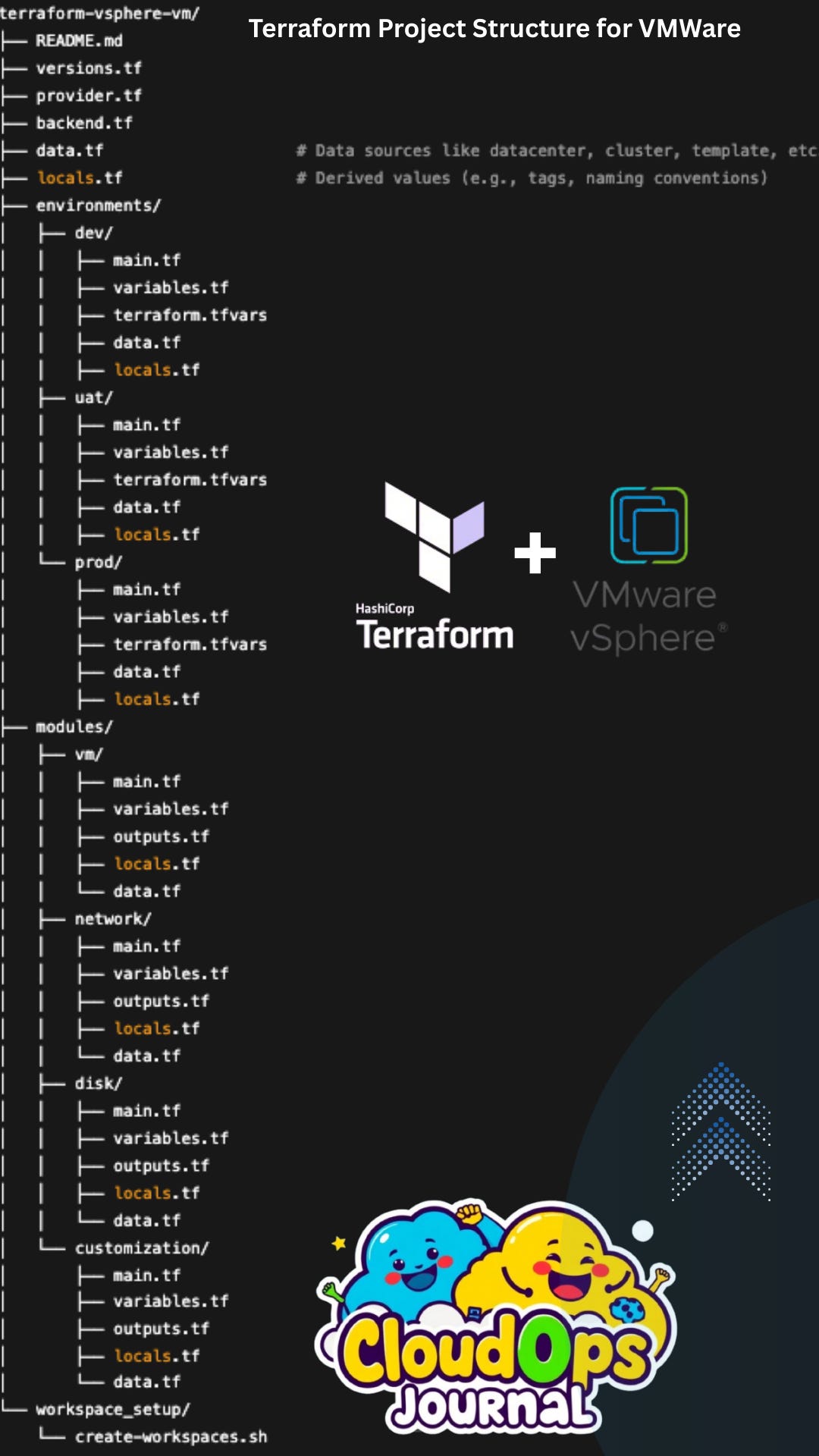
📁 Overview: Project Directory Structure
The project is organized to support:
Multi-environment deployments (
dev,uat,prod)Reusability via modular design
Scalability and automation using workspaces and CI/CD integration
🧱 Root-Level Files
README.md
Project overview, usage instructions, and prerequisites.
✅ Best practice: Include how to use workspaces, module inputs, and secrets management.
versions.tf
Specifies the required Terraform version and provider versions.
✅ Best practice: Lock versions to avoid unexpected breaking changes.
provider.tf
Configures the vSphere provider, often referencing
TF_VAR_*environment variables for security.✅ Best practice: Don’t hardcode secrets; use Jenkins credentials or
.tfvarsfiles.
backend.tf
Defines the remote backend (e.g., S3 + DynamoDB) for state storage and locking.
✅ Best practice: Use environment-specific state files with workspace key prefixes.
data.tf
Centralized location for reusable data sources like datacenters, clusters, datastores, templates, and networks.
✅ Best practice: Keep this DRY and minimal; share common logic across modules.
locals.tf
Derived values such as naming conventions, tag formats, or environment settings.
✅ Best practice: Store computed values to avoid repetition in resources and modules.
🌍 Environment-Specific Configuration: environments/
Each environment (dev, uat, prod) is self-contained and contains:
main.tf
Entry point that calls reusable modules (
vm,network,disk,customization).✅ Best practice: Clearly define module sources and pass environment-specific variables.
variables.tf
Declares all inputs required by this environment.
✅ Best practice: Document descriptions, types, and defaults where applicable.
terraform.tfvars
Contains sensitive or environment-specific values (e.g., IPs, templates, naming prefixes).
✅ Best practice: Never commit secrets to version control.
data.tf & locals.tf
Environment-specific data lookups (e.g., different datacenters).
Local values derived for naming, tagging, or conditions based on the env.
⚙️ Reusable Modules: modules/
Each module is focused, loosely coupled, and reusable.
vm/
Provisions the virtual machine.
Inputs: CPU, memory, guest OS, template, boot options.
Outputs: VM ID, IP, hostname.
network/
Handles VM NIC assignment and port group attachment.
Supports dynamic or static IP assignment.
disk/
Manages one or more disks, sizes, and storage policies.
✅ Best practice: Support dynamic disk count using
for_each.
customization/
Handles guest OS customization: hostname, domain, DNS, post-deploy scripts.
Each module includes:
main.tf: Resource definitions.variables.tf: Input schema.outputs.tf: Values passed back to root.locals.tf: Naming and tag formatting.data.tf: Module-specific data sources.
✅ Best practice: Use module versioning via Git tags or registries for stability.
🧰 Utility: workspace_setup/
create-workspaces.sh
Script to automate creation of Terraform workspaces for
dev,uat, andprod.
#!/bin/bash
for env in dev uat prod; do
  terraform workspace new $env || echo "Workspace $env already exists"
done
✅ Best practice: Run in CI/CD or during project bootstrap.
🚀 Best Practices Summary
Category Best Practice
🔒 Security Use secrets via environment variables or Jenkins credentials
🪜 Modularization Keep modules small, composable, and reusable
🚦 Environments Use isolated terraform.tfvars and workspaces
📦 State Management Use remote backend with locking (S3 + DynamoDB recommended)
✅ CI/CD Automate init, plan, apply, and approval workflows (e.g., via Jenkins)
🧪 Validation Use terraform validate and tflint pre-apply
📚 Documentation Keep README.md updated with module usage, variables, and outputs
If you're working with VMware + Terraform, happy to connect and share notes! 💬
#Terraform #vSphere #InfrastructureAsCode #DevOps #Automation #CI/CD #HashiCorp #VMware #TerraformModules